1. Materials Characterisation and Fabrication Platform
  2. MCFP Learning
  3. Scanning Electron Microscopy
  4. Getting good images
  5. Scan speed
  • Scanning Electron Microscopy
  • Introduction
  • Applications of SEM
  • All Fundamentals of SEMThe sourceThe columnThe chamber and sample stageElectron interactions and detected signalsVacuum modes
  • All Getting good imagesSample preparationBeam conditionsChoosing the detectorFocussing and working distanceBrightness and contrastScan speedStigmatism
  • Get into the lab!

Scan speed

To improve the quality of the image we need to reduce the scan speed. This is equivalent to increasing dwell time, which may be used on some SEM instruments. Slowing the scan speed down gives the detector and the image processing electronics more chance to "count" the signal being detected (i.e. electrons) and therefore improves your signal to noise ratio.

Reducing your scan speed will:

  • Reduce noise in your image
  • Increase visible details on your surface
  • Improve the accuracy of measurements you make with your image
  • Increase the time needed to acquire an image
  • Slow 1 imaging in SEM
    Capturing an image with a fast acquisition leads to noise in the image and reduced quality
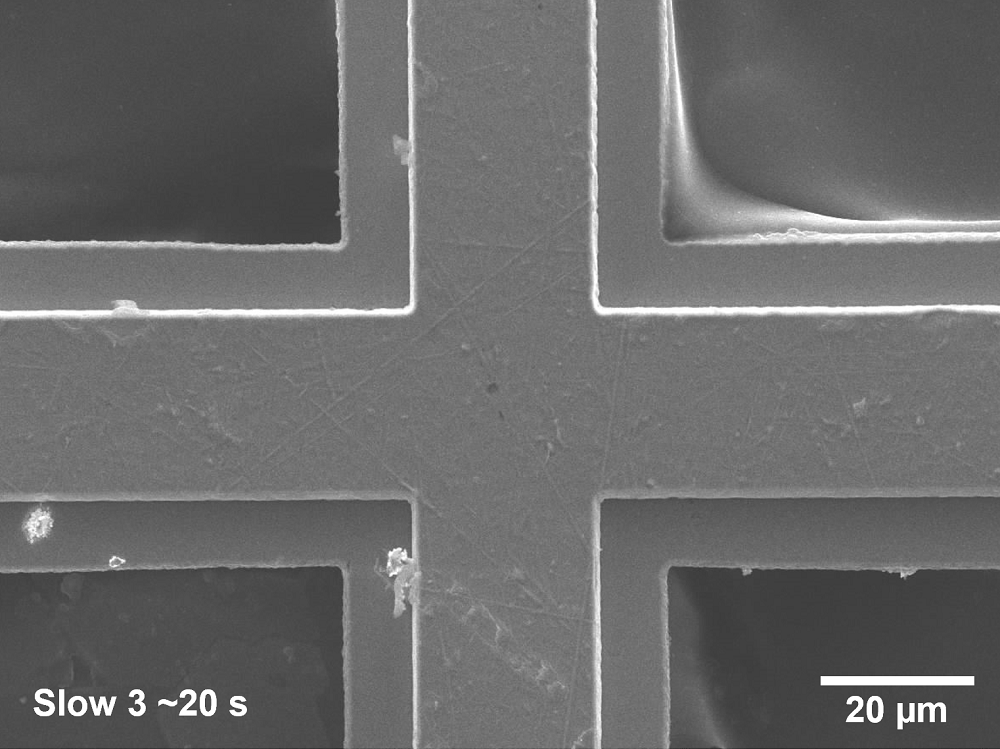
  • Slow 3 imaging in SEM
    Reducing the scan speed reduces the noise, improves the image quality, but takes longer to acquire
  • Slow 6 imaging in SEM
    Capturing at the slowest acquisition speed results in the best quality image, but takes the longest

Quick Guide to Scan Speed

  • Used primarily for navigation around a sample to find regions of interest, and for setting your field of view.

    • ~80 ms per frame
    • Very high noise ratio
    • Better used with SE detector
  • Used to help precisely navigate around on a specimen, or to set field of view, when higher quality is needed to see features.

    • ~1-4 s per frame
    • Better quality image, but can be noisy with low signal
    • Slow 1 most useful for navigation with BSE detector
  • For capturing images of higher quality after regions of interest found, field of view set, and image is focussed.

    • ~20-160 s per frame
    • Best quality for capturing images
  • Most used for focussing and stigmation adjustment but can be useful for finding features of interest and navigation.

    • Improved image quality over fast scan
    • Increased frame rate due to reduced scan area

Next - Stigmatism Correction

Back to MCFP Learning Home

Materials Characterisation and Fabrication Platform

  • Our Capabilities
    • Nanofabrication
    • Nanomaterials Characterisation
      • Atomic force microscopy
      • Anton Paar NHT3 Nanoindenter
      • DataPhysics optical contact angle
      • Hirox RH-2000 2D/3D microscope
      • Quorum Q150T Sputter Coater
    • Advanced Fluorescence Imaging
      • Zeiss Elyra 7 Lattice SIM
      • Nikon A1R+ Confocal Microscope (CLSM)
      • STORM (Stochastic optical reconstruction microscopy): Nikon N-STORM
      • Olympus IX71 Fluorescence Microscope
    • Cytometry and Particle Characterisation
      • Mass cytometry
      • Halo
      • NanoSight Pro
      • Apogee A-50 Microflow Cytometer
      • CytoFLEX Nano
      • Imaging Flow Cytometry
      • ICP-MS
      • Imaging ToF-ICP-MS
    • Electron and Ion Microscopy
      • Scanning electron microscopy (SEM)
      • Helium ion microscopy and dual-beam nanofabrication
      • Sample Preparation
    • X-Ray Characterisation
      • X-ray diffraction (XRD)
      • X-ray fluorescence (XRF)
    • Vibrational Spectroscopy
      • Confocal Raman Microspectroscopy
      • Fourier Transform Infrared Microscopy
    • Biological Optical Microscopy Platform (BOMP)
    • Ian Holmes Imaging Centre
    • Trace Analysis for Chemical, Earth and Environmental Sciences (TrACEES)
    • University of Melbourne Research Infrastructure
    • MCFP 2023 User Survey
  • Access Equipment
  • MCFP news and events
    • MCFP Image Competition
      • MCFP Image Competition
  • Our Expertise
    • Elena Taran
    • Anders Barlow
    • Paul Brannon
    • Darryl Johnson
    • Dan Smith
    • Raveen Wijesuriya
    • Tian Zheng
    • Ray Dagastine
    • George Franks
  • Services for Industry
  • MCFP Learning
    • Video Guides
      • LUMOS ATR-FTIR Guides
      • CytoFLEX Guides
      • NanoSight Guides
      • FlexSEM-EDS Guides
    • FlexSEM-EDS FAQs
  • Sustainability
    • Sustainability Framework
    • Sustainability on Campus
    • FEIT Sustainability
    • Green Impact
    • Sustainable ANFF
  • Publications
  • Current Students
  • Library
  • Staff

Acknowledgement of Country

We acknowledge Aboriginal and Torres Strait Islander people as the Traditional Owners of the unceded lands on which we work, learn and live. We pay respect to Elders past, present and future, and acknowledge the importance of Indigenous knowledge in the Academy.

Read about our Indigenous priorities

Site footer

  • About us
  • Careers at Melbourne
  • Safety and respect
  • Newsroom
  • Contact
  • Campus locations

Contact details

Phone 13 MELB (13 6352)
International +61 3 9035 5511

Address
The University of Melbourne
Grattan Street, Parkville
Victoria 3010
Australia

Connect with us

  • Emergency
  • Terms & privacy
  • Accessibility
  • Privacy
  • The University of Melbourne (Australian University): PRV12150
  • CRICOS number: 00116K
  • ABN: 84 002 705 224